The modern home theater and gaming setups often require fast, reliable switching between multiple HDMI sources. This guide highlights five top 3-in-1 HDMI switch hubs designed to send a single display from three input devices, with options ranging from compact, remote-controlled models to rugged aluminum housings. Each product is evaluated on performance, build quality, ease of use, and compatibility, helping American readers choose a model that fits their entertainment center without clutter or lag.
style=”display:none;”>Summary Table
style=”display:none;”>Product | Brand | Key Features
- GANA HDMI Switch 3 in 1 Out – Manual switching, 4K@30Hz, 3 inputs
- avedio links HDMI Switch 3×1 – Aluminum alloy, 4K@60Hz, HDCP 2.2
- [Upgrade] NEWCARE HDMI Switch 3 in 1 Out – 4K@60Hz, includes 2.6ft cable, 3 in 1 out
- UGREEN HDMI Switch 3 in 1 Out – Remote + Manual, 4K@30Hz/60Hz, HDCP 1.4/2.2
- vilcome HDMI Switch 3 in 1 Out – 4K@30Hz, 3 inputs, plug-and-play
GANA 3 In 1 Out HDMI Switch

The GANA 3-in-1 HDMI switch streams signals from up to three HDMI sources to a single display. It supports 4K at 30Hz and 1080p, with 3D capability and HDCP compliance to avoid signal distortion. The device is designed for easy manual switching; users press a button to switch inputs, avoiding re-cabling during playtime or work sessions. Note that it does not display multiple screens simultaneously, so users should select a single source for each viewing session. Compatible with PS4/PS3/Xbox and other HDMI devices, it’s a practical option for compact setups.
avedio links 3×1 HDMI Switch

The avedio links 3×1 HDMI Switch presents a premium aluminum chassis and supports 4K at 60Hz with HDCP 2.2. It is designed to switch seamlessly between three inputs to a single output, offering smooth transitions without noticeable lag. The product emphasizes durability and stable performance, ideal for home theaters or gaming setups that require reliable signal integrity. It is important to note it is a 3×1 in, 1 out design and does not output to multiple displays at once, which aligns with typical 3-port hub expectations.
[Upgrade] NEWCARE HDMI Switch 3 In 1 Out

NEWCARE’s 3-in-1 HDMI switch offers 4K at 60Hz capability and includes a 2.6-foot high-speed HDMI cable. It’s designed for easy plug-and-play use, with a button-press switching mechanism to move between inputs. The device supports 4K output and 1080p with deep color and HDCP 2.2 compatibility. It targets users who want a straightforward, reliable hub for trade shows, living rooms, and workspaces, delivering clear image quality without the need for external power in typical use cases.
UGREEN HDMI Switch 3 In 1 Out

UGREEN’s 3-in-1 HDMI switch provides both manual switching and remote control for flexible use from a couch or desk. It supports 4K at 30Hz, and when connected to HDMI 2.0 sources, can handle HDR and HDCP 2.2. The device is designed to be compatible with common devices such as Nintendo Switch, PS5, PS4, Xbox, and streaming devices. The inclusion of a remote makes it convenient for family rooms and media centers where quick input changes are frequent. It’s also noted to work within typical HDMI cable length recommendations for stable performance.
vilcome HDMI Switch 3 In 1 Out
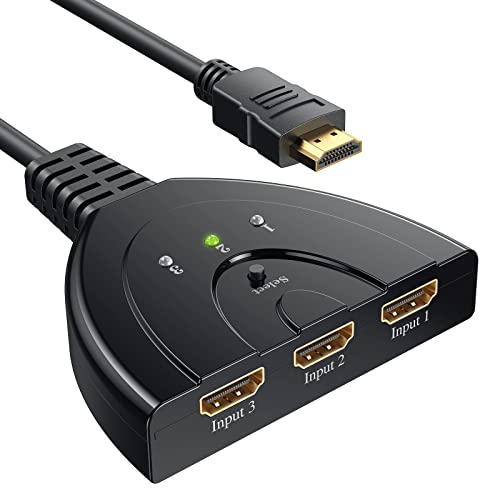
The Vilcome 3-in-1 HDMI hub emphasizes plug-and-play simplicity with a 4K capability at 30Hz and 3D support. It targets users who want a straightforward, no-fuss switch for up to three inputs into one display. The product notes that it does not display multiple screens simultaneously. It’s positioned as a versatile option for gaming consoles, Blu-ray players, Roku, and digital streaming devices, making it suitable for living rooms, dorm rooms, and shared entertainment areas. Durability and ease of use are core selling points for this model.
Buying Guide: Key Considerations and Comparisons
- Resolution and refresh rate: Most 3-in-1 hubs support 4K, typically at 30Hz or 60Hz. If you play fast-paced games or want smoother 4K playback, prefer models offering 4K@60Hz where available, noting that many budget hubs top out at 4K@30Hz.
- HDCP compatibility: Ensure HDCP 1.4/2.2 compatibility matches your content sources (Blu-ray, streaming devices, game consoles). HDCP compliance protects content but can affect compatibility with certain displays.
- Control method: Manual button switching is common and reliable; remotes add convenience. Consider the distance you’ll sit from the console or TV when choosing a remote-enabled model.
- Build quality: Aluminum enclosures tend to dissipate heat better and feel more durable. Plastic housings are lighter and more affordable but may be less robust over time.
- Compatibility and cabling: Verify that the hub supports your devices (PS5, Xbox, Nintendo Switch, streaming boxes). Most hubs come with a high-speed HDMI cable; if not, check cable requirements for 4K60 availability.
- One-input-to-one-output limitation: All the reviewed products are 3 inputs to 1 output. They will not mirror to multiple displays, which is typical for a 3-port hub scenario.
- Cable length and power: Some hubs require external power for stable 4K/60Hz operation, especially when longer HDMI cables are used. Others are bus-powered and may work without an extra power adapter for standard setups.
When selecting a 3-port HDMI hub, users should align their choice with their primary usage—gaming, streaming, or office presentations—and the layout of their entertainment space. The featured models balance price, performance, and convenience, enabling a clutter-free setup without sacrificing signal integrity.