Choosing the right 3.5 inch bay solutions can simplify upgrading, back up routines, and hot-swapping drives in desktops and workstations. This guide reviews five top options that support standard 3.5″ SATA drives, with features ranging from hot-swap backplanes to multi-drive enclosures. Each product highlights compatibility, speed, and ease of use to help you select a solution that fits your setup and workflow. The table below summarizes the selected models and key capabilities for quick reference.
| Product | Brand | Key Benefit | Drive Support |
|---|---|---|---|
| SABRENT EC-HD2B | SABRENT | Dual bay docking with cloner function | 2.5″/3.5″ SATA HDD/SSD |
| HSB3SATSASBA | StarTech.com | Three-drive hot swap backplane | 3.5″ SATA/SAS HDD |
| DD28 | ORICO | Tool-free dual bay docking with UASP | 2.5″/3.5″ SATA HDD/SSD |
| HSB1SATSASBA | StarTech.com | Trayless 5.25″ to 3.5″ bay with hot swap | 3.5″ SATA/SAS HDD/SSD |
| WAVLINK 4-Bay | WAVLINK | High-capacity four-bay enclosure with USB-C 3.2 | 3.5″/2.5″ HDD/SSD |
Across these devices, the common goals are to maximize storage density, simplify drive management, and support rapid data transfer. Whether you’re building a robust home media server, a backup station, or a professional workstation, the following selections provide varied approaches—from dedicated hot-swap backplanes to versatile front-bay adapters and multi-drive enclosures. Read on for detailed product overviews and practical guidance on choosing the right bay solution for your needs.
SABRENT EC-HD2B Dual Bay Docking And Cloner

The SABRENT EC-HD2B provides a practical dual-bay external docking station capable of handling 2.5″ or 3.5″ SATA drives, including HDDs and SSDs. With support for drives up to 10TB and a plug-and-play design, it eliminates driver installation for quick setup. A standout feature is the built-in hard drive duplicator/cloner function, enabling fast, turnkey duplication without separate software. This makes it well-suited for backups, system imaging, and rapid deployment scenarios. The simple USB connection helps minimize compatibility concerns, and the 20+TB support makes it adaptable for growing storage needs. For users prioritizing a compact, straightforward cloning workflow, this model offers dependable performance with minimal fuss.
Features in focus:
– Supports standard desktop 2.5″/3.5″ SATA drives or SSDs
– Up to 10TB per drive
– Plug-and-play operation
StarTech Hot Swap Backplane For 3.5in Drives

This StarTech backplane converts two 5.25″ bays into a versatile hot-swappable interface for up to three 3.5″ SATA or SAS HDDs. The design prioritizes maximum drive compatibility with SATA I/II/III and SAS I/II, making it a robust choice for enterprise or enthusiast builds. Each bay has its own power and status LEDs, aiding monitoring and maintenance. Ejection levers and optional key-lock security add practical safeguards for sensitive data. The trayless concept speeds drive changes, while compatibility with a range of drive types keeps options open for future upgrades. If you need easy, secure hot-swapping in a multi-drive system, this is a compelling option.
Key points:
– Supports up to three 3.5″ drives
– Trayless, with individual eject levers
– Key-locked security option
StarTech 3.5″ Front Bay Mounting Bracket
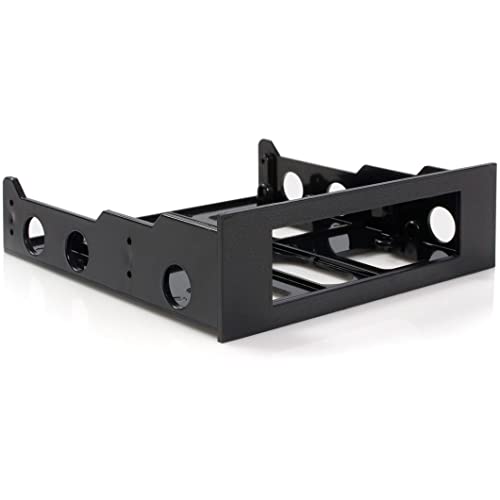
This StarTech mounting bracket enables 3.5″ devices to fit into a 5.25″ front bay. It is widely compatible with a range of front-facing drives and peripherals like external USB hubs and media card readers. The kit includes mounting screws, aiding straightforward installation for technicians and IT professionals performing system setups. Note that this bracket is not designed for direct 3.5″ hard drives inside a 5.25″ bay, but it expands front-panel options for 3.5″ hardware. It’s a practical choice when adding peripherals or adapters into a front bay without dedicated drive trays.
Cenmate Aluminum Dual Bay Enclosure

The Cenmate dual-bay enclosure offers a robust external storage solution for 2.5″ and 3.5″ SATA HDDs and SSDs, with USB 3.0 connectivity and a built-in 2-inch cooling fan. It supports hot-swappable operation and is designed with aluminum for thermal management and durability. With a maximum practical capacity in the dozens of terabytes across drives, this enclosure is well-suited to media libraries, backups, and small-scale professional storage work. The kit emphasizes efficiency, cooling, and straightforward hot-swapping, making it a strong choice for users who value continuous performance in a compact enclosure.
Highlights:
– Supports 2.5″/3.5″ drives; up to 20TB per drive
– Aluminum housing with a cooling fan
– USB 3.0 for fast transfers; hot-swapping supported
WAVLINK Four-Bay USB-C 3.2 Drive Enclosure

The WAVLINK 4-Bay enclosure provides expansive capacity and versatile connectivity. It supports both 3.5″ and 2.5″ HDDs and SSDs across four bays, with USB-C 3.2 providing up to 10Gbps transfer rates. It also features an HDMI output for display tasks, under specific configurations, making it a candidate for multimedia workstations and media servers. The enclosure combines high capacity with flexible connectivity, enabling a mix of drives for backups, cloning, and large-scale data projects. Note that using 2.5″ drives may require mounting brackets not included in some sets, so verify included accessories if you plan to mix drive sizes.
Key considerations:
– Four drive bays for expanded storage
– USB-C 3.2 with up to 10Gbps; HDMI display option
– Aluminum or sturdy shell; cooling considerations for sustained loads
Buying Guide: Key Purchase Considerations
- Drive compatibility and size: Confirm that the device supports your drive types (2.5″ vs 3.5″, SATA I/II/III, SAS) and the intended maximum per-drive capacity. Some models excel with enterprise-grade drives, while others target consumer HDDs/SSDs.
- Hot-swapping vs. cloning: If you need rapid deployment or backups, prioritize hot-swap backplanes and cloning features. Trayless designs with easy eject mechanisms speed drive replacement without powering down the system.
- Connectivity and speed: USB 3.0/3.1/3.2 and USB-C interfaces offer different transfer ceilings. For large data transfers or media workflows, prefer devices supporting USB-C 3.2 Gen 2×2 or faster, with potential HDMI output for display tasks in some models.
- Cooling and noise: Enclosures with built-in fans and aluminum chassis help manage thermal load during sustained operations. Consider noise levels if the device will be placed in a quiet workspace.
- Form factor and installation ease: Trayless backplanes and tool-free designs simplify maintenance and exchanges. Front-bay adapters are convenient for desktop builds with space constraints, while larger enclosures suit stationary backups setups.
- Security: Some hot-swap backplanes offer lockable drive bays or key controls for added security in shared environments. If data protection is critical, review this feature.
- Expansion and future-proofing: If you anticipate growing storage needs, select solutions with higher per-drive capacities and multiple bays. Consider whether you’ll use one enclosure for backups, another for media, or a shared pool across systems.
Overall, the best choice depends on your workflow: a dual-bay docking station with cloning is ideal for quick duplications; a multi-bay backplane shines in servers or workstations requiring frequent drive swaps; and a four-bay enclosure offers substantial capacity for a high-demand storage setup. Each product listed balances ease of use, compatibility, and performance to support a range of 3.5″ bay applications in American home and professional environments.