For data integrity and longevity, cooling is essential when housing 3.5-inch SATA HDDs and SSDs in external enclosures. The following picks emphasize built-in fans, solid build quality, and easy setup. Each product supports common drive sizes and USB interfaces, with some offering RAID options or UASP support for faster transfers. This guide compares cooling performance, compatibility, and user-friendly features to help you choose a reliable, well-ventilated enclosure for home, office, or on-the-go backups.
| Product | Brand | Key Benefit |
|---|---|---|
| FIDECO Hard Drive Enclosure | FIDECO | Supports 2.5″ & 3.5″ drives with 5Gbps USB 3.0 and cooling fan |
| SABRENT EC-DFFN Docking Station | SABRENT | Built-in cooling fan; hot-swappable; supports 2.5″/3.5″ drives |
| MAIWO Dual Bay RAID Enclosure | MAIWO | Two bays with RAID modes and active cooling |
| Vantec NexStar HX | Vantec | 3.5″ enclosure with integrated fans and high-speed USB 3.0 |
| GODO 3.5 In USB Enclosure | GODO | Aluminum housing, built-in cooling fan, UASP support |
Below is a curated selection of five enclosures that emphasize airflow and reliable performance, suitable for users needing robust cooling for larger drives and continuous use scenarios.
FIDECO 3.5/2.5 Inch Enclosure With Cooling Fan

FIDECO’s enclosure supports both 2.5″ and 3.5″ SATA drives, enabling flexible upgrades. It uses a USB 3.0 interface for speeds up to 5Gbps and is backward compatible with USB 2.0. A built-in cooling fan helps maintain drive temperatures during extended transfers. The device is tool-free and Plug and Play, with a 12V power adapter to support higher-capacity drives and sustained workloads. UASP support improves data transfer efficiency on compatible systems.
SABRENT EC-DFFN Docking Station With Cooling Fan
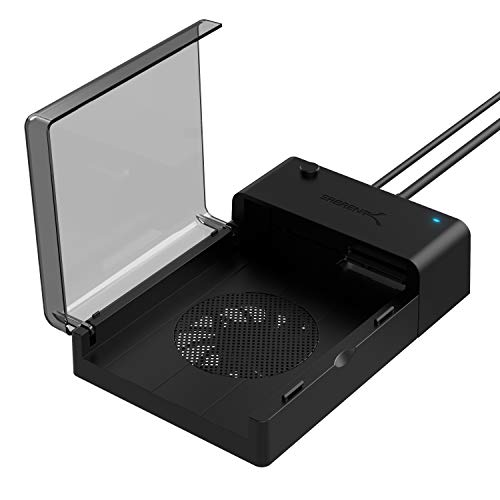
This SABRENT docking station lays flat to accommodate 2.5″ or 3.5″ SATA drives and includes a built-in cooling fan to keep drives cool during operation. It supports hot-swapping and plug-and-play operation without needing drivers, providing a straightforward external storage solution for desktops and workstations. The design emphasizes airflow to reduce heat buildup, especially useful when running multiple drives or lengthy backups.
MAIWO Dual Bay RAID Enclosure With Cooling

MAIWO’s dual-bay enclosure supports 2.5″ and 3.5″ SATA HDD/SSD, with RAID 0/1/JBOD/PM modes. It uses USB 3.0 with up to 5Gbps transfer speeds and integrates a cooling fan to improve thermal performance. The aluminum chassis aids heat dissipation, and the enclosure is designed for Windows, macOS, and Linux. RAID functionality enables performance or redundancy tailored to different workloads, though setup requires initial data backup and formatting.
Vantec NexStar HX 3.5″ Enclosure With Fan

Vantec’s NexStar HX is designed for large-capacity drives and supports SATA III up to 6Gbps with USB 3.0. An integrated fan helps expel hot air, while the enclosure remains compatible with Windows, macOS, and Linux without drivers. The cooling design aims to reduce thermal throttling during sustained transfers, making it suitable for media libraries or backup repositories that stay online for extended periods.
GODO 3.5 Inch Enclosure With UASP Cooling

GODO offers a 3.5″ enclosure with aluminum housing and an independent 12V/2A power supply for stable operation. It features UASP support for faster data transfers and enhanced energy efficiency. The design emphasizes heat dissipation and safety protections to guard against voltage and short circuits. It is Plug and Play with a clear LED indicator, suitable for users needing a compact, cooled external drive solution for larger HDDs or high-demand tasks.
SABRENT EC-DFLT USB 3.0 Docking Station

This SABRENT docking station supports both 2.5″ and 3.5″ SATA drives with USB 3.0, delivering up to 10x faster speeds than USB 2.0 in optimal conditions. It includes UASP support for improved performance on capable hosts. The enclosure is designed for easy insertion and removal of drives, with firmware considerations for higher-capacity drives to ensure compatibility and stability during use.
UGREEN 3.5/2.5 Inch Enclosure With UASP
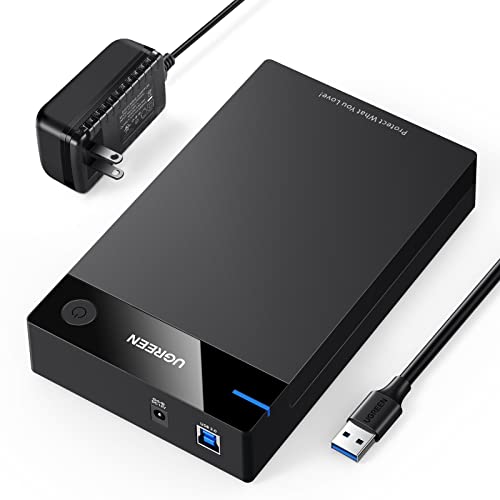
UGREEN’s enclosure supports 3.5″ and 2.5″ drives up to 20TB with 5Gbps USB 3.0 transfers. It uses UASP for faster data transfers and features an intelligent chip for performance and protection. Heat-dissipation holes aid cooling, while soft rubber strips protect drives from shock. The design balances affordability with practical cooling and broad compatibility across operating systems.
Buying Guide: Key Purchase Considerations
Performance and cooling: Prioritize enclosures with active cooling fans and aluminum or ventilation-friendly housings to manage heat during heavy data transfers. Fan noise should be considered if the enclosure will run in quiet spaces.
Drive compatibility: Ensure the enclosure supports the intended drive sizes (2.5″ and/or 3.5″) and capacities. Some models include RAID options for redundancy or performance boosts; assess whether you need JBOD, RAID 0, or RAID 1 depending on your data strategy.
Interface and speed: USB 3.0 or USB 3.1/3.2 Gen 1 interfaces deliver higher transfer rates. UASP support offers improved efficiency and faster read/write speeds on compatible hosts.
Power and reliability: Check for a dedicated 12V power adapter and robust build materials (aluminum or sturdy plastics) to ensure stable operation and heat dissipation for extended use.
Ease of use: Tool-free assembly, plug-and-play setup, and clear LED indicators help streamline installation and ongoing maintenance. Consider whether you need hot-swapping for quick drive swaps.
Platform compatibility: Verify compatibility with Windows, macOS, and Linux if you plan to switch systems. Some devices require firmware updates for larger drives or newer OS versions.