Keeping 3.5″ hard drives cool and reliable is essential for data integrity and device longevity. This guide highlights top cooling solutions that fit 3.5″ drives, from simple cooling bays to full enclosure systems with built-in fans. Each option aims to reduce operating temperatures, minimize dust exposure, and support easy installation for both hobbyists and professionals. Below is a quick overview of five relevant products to help you compare cooling performance, compatibility, and expansion needs.
| Product | Brand | Type | Key Benefit |
|---|---|---|---|
| Vantec iCEBERQ HDC-6015 | Vantec | Hard Drive Cooler | Direct cooling for 3.5″ IDE/SATA drives |
| EverCool Dual 5.25″ Bay to 3.5″ HDD Box | Evercool | Drive-bay to 3.5″ HDD enclosure | Multi-drive cooling in a single bay |
| SABRENT EC-DFFN Docking Station | SABRENT | Docking with cooling fan | Hot-swappable with built-in cooling |
| CENMATE 3 Bay Enclosure | CENMATE | External enclosure | USB 3.0, cooling fan, high capacity |
| FIDECO Enclosure with Cooling Fan | FIDECO | Enclosure with cooling | USB 3.0, UASP support |
Vantec iCEBERQ Hard Drive Cooler HDC-6015

The Vantec iCEBERQ HDC-6015 offers easy installation for a 3.5″ IDE or SATA hard drive and aims to reduce operating temperatures. By lowering drive temperatures, it helps extend the life of the drive and maintain performance during intensive workloads. This cooler focuses on direct cooling contact and straightforward integration with existing drive bays.
EverCool Dual 5.25 in. Drive Bay to Triple 3.5 in. HDD Cooling Box

EverCool’s cooling box converts two 5.25″ drive bays into three 3.5″ HDD bays with inside filters for dust control. The design emphasizes dust filtration and a compact footprint, while the dual-bay entry aims to provide distributed cooling across multiple drives, helping to maintain consistent temperatures in a compact PC case.
SABRENT USB 3.0 Docking Station With Built‑in Cooling Fan
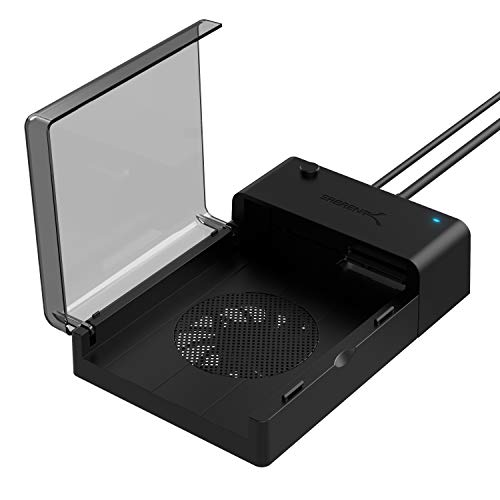
The SABRENT docking station supports standard 2.5″/3.5″ SATA drives and includes a built-in cooling fan. It is hot-swappable and plug-and-play, requiring no drivers. This option offers convenient access for frequent data transfers and ensures drives stay cooler during continuous operation or heavy data copying tasks.
CENMATE Aluminum Dual Bay Enclosure With Cooling Fan

This dual-bay enclosure supports 2.5″/3.5″ SATA HDDs and SSDs with USB 3.0. It features an aluminum alloy body and a 2″ fan to minimize heat buildup. Transferring data at USB 3.0 speeds helps sustain performance, particularly when multiple drives operate concurrently.
CENMATE 3 Bay Hard Drive Enclosure With Cooling Fan

This third-bay enclosure expands storage while maintaining drive temperatures with an integrated 2.7″ fan. It supports 2.5″/3.5″ drives and offers USB 3.0 for faster file transfers. Users can expect hot-swappable operation and easy, tool-free installation for ongoing data needs.
CENMATE 4 Bay Enclosure With Cooling Fan

The 4-bay enclosure supports up to 80TB total capacity across drives and includes a robust cooling fan solution. Aluminum construction helps dissipate heat, while USB 3.0 delivers high-speed data transfer. It is designed for both professional and personal use where high data volumes are routine.
Buying Guide: Key Purchase Considerations
- Drive compatibility: Confirm support for 2.5″ and/or 3.5″ SATA drives, and whether the unit accepts both HDDs and SSDs.
- Cooling vs. enclosure: Decide between a simple cooling accessory, a drive-bay adapter, or a full enclosure with an integrated fan. Higher drive counts benefit from active cooling in multi-drive setups.
- Heat management: Look for features like aluminum bodies and large fans in conjunction with a well-placed intake/exhaust design to maximize heat dissipation.
- Connectivity and speed: USB 3.0 (or higher) with UASP support offers faster transfers and better compatibility with modern systems.
- Noise and noise sensitivity: Fans add audible noise; check decibel ratings if noise is a concern, especially in quiet environments.
- Expansion needs: If you plan to scale storage, consider enclosures that support multiple drives, hot-swapping, and daisy-chaining capabilities for future upgrades.
- Maintenance: Enclosures with removable filters or easy-to-clean dust filters help maintain cooling efficiency over time.
- Physical fit: Ensure the enclosure or cooler fits your PC case or workstation space, particularly for drive bays and front-panel mounting.