The 3.5 and 5.25 inch bay areas on desktops often need cooling or expansion options. This article highlights five compatible products that fit 5.25 inch bays or convert those bays for additional fans, drives, or controllers. Each item includes key features to help you choose the right solution for better airflow, drive protection, and convenient upgrades.
| Product | Brand | Key Benefit |
|---|---|---|
| EverCool Dual 5.25 in. Drive Bay to Triple 3.5 in. HDD | Evercool | Converts bays and dust filters for HDD cooling |
| 120mm Fan Bracket for 5.25 Inch Bay | Generic | Allows 120mm fan installation in a 5.25″ slot |
| StarTech 3.5″ to 5.25″ Front Bay Bracket | StarTech.com | Front bay support for 3.5″ drives or devices |
| Rosewill Internal Hard Drive Enclosure Cage | Rosewill | Hot-swap 3.5″ bays from 5.25″ space |
| 5.25″ Fan Assembly for Optical Drive Bay | Generic | Simple replacement for vented 5.25″ bays |
EverCool Dual 5.25 Bay to Triple 3.5 HDD Cooling

The EverCool unit converts dual 5.25″ drive bays into three 3.5″ HDD slots, offering a compact way to expand storage while maintaining airflow. Inside demountable filters simplify dust control and cleaning, helping keep the PC interior clean over time. The asymmetrical design also helps cushion HDDs from minor vibrations, potentially reducing wear. This solution is suited for users wanting to repurpose bays for HDD capacity rather than optical drives, with dust filtration aiding long-term drive reliability.
120mm Fan Bracket For 5.25 Inch Drive Bay

This 5.25″ bay bracket enables installation of a 120mm case fan, turning an existing drive bay into an active cooling outlet. The product supports various color options and multi-pack purchases, making it easy to outfit multiple bays or customize a build. It is ideal for users seeking straightforward airflow improvements without relocating existing drives.
SaiDian 5.25 Inch Fan Speed Controller and Front Panel

This front-panel controller for 5.25″ bays includes a temperature sensor LCD and date/time display, aiding real-time monitoring of system cooling. It offers manual and automatic fan control with a temperature alarm and adjustable thresholds to prevent overheating. The unit helps users balance noise and cooling by dialing fan speed to match workload and ambient conditions. It supports broader temperature management alongside drive health considerations.
StarTech 3.5″ to 5.25″ Front Bay Bracket
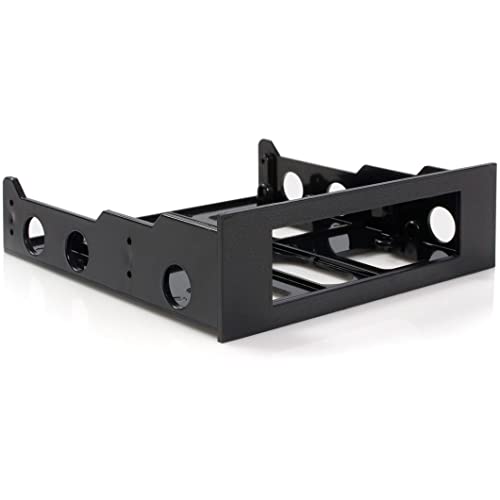
StarTech’s mounting bracket allows a 3.5″ drive or accessory to sit in a 5.25″ front bay, with included screws for quick assembly. This bracket is particularly useful for IT professionals building or upgrading front-panel configurations, including external USB hubs or fan controllers. Note that the product is not compatible with 3.5″ hard drives, focusing instead on adapters and front-panel devices that fit within 5.25″ bays.
GBL Gifts 120mm Fan Bracket For 5.25 Inch Bays

Made in America, this 120mm fan bracket provides a straightforward method to add cooling in a 5.25″ bay area. It is designed for compatibility with standard desktop cases, offering a simple upgrade path for improved airflow around drives or controllers installed in the bay. While it focuses on cooling, it complements other internal bay upgrades by boosting exhaust and intake airflow around critical components.
5.25 Inch Fan Assembly For Vented Optical Bay

This vented hexagon small fan assembly is designed to fit a 5.25″ drive space, offering an economical option for improving airflow in older or budget builds. It’s a straightforward replacement part intended for those who want to restore intent of a front bay with fresh cooling without adding complexity. It is a practical upgrade where space and budget are primary concerns, and it aligns well with other bay-based cooling upgrades described in this article.
Buying Guide: Key Considerations For 3/5.25 Bay Fans And Accessories
- Compatibility: Confirm whether the bay is directly 5.25″, or if it requires an adapter (3.5″ to 5.25″ brackets) to install a fan, drive, or controller.
- Cooling vs. Expansion: Decide whether the goal is to improve airflow to existing components, add drive bays, or support front-panel devices like USB hubs or controllers.
- Airflow and Noise: Larger fans (e.g., 120mm) can move more air at lower RPM for quieter operation. Consider mounting locations to maximize intake or exhaust airflow.
- Dust Management: Units with removable filters help maintain interior cleanliness and can extend component life. Filter accessibility matters for maintenance.
- Power and Cabling: Ensure adequate power cables or connectors are available for any new fans or devices. Front-panel controllers may require dedicated headers or power.
- Durability and Build Quality: Look for brackets and enclosures built to fit standard bays and provide stable mounting to minimize vibration.
- Future Upgrades: Choose modular solutions that accommodate potential future additions, such as additional drives or front-panel peripherals.
- Regulatory Compliance: Some brackets and cages are designed for specific markets; check for compatibility with your system’s form factor and warranty terms.
These considerations help buyers select the right combination of bay-fan upgrades to balance cooling, noise, and storage needs. By evaluating product features, you can tailor a solution that optimizes airflow and space within a desktop PC.