In modern desks, a reliable 2-way KVM switch streamlines work by letting two PCs share one monitor, keyboard, and mouse. This guide reviews five top models, highlighting how each handles display resolution, USB peripherals, and ease of use. Use the buying guide to compare features and choose a switch that fits your setup.
| Product | Key Benefit | Resolution Support | Special Feature |
|---|---|---|---|
| Hearvo USB 3.0 HDMI KVM Switch | Comprehensive USB + HDMI switching | 4K@60Hz | EDID adaptive support; includes 2 USB cables and controller |
| BMKZAYR HDMI KVM Switch | Simple plug-and-play with two computers | 4K@60Hz | Two-in, one-out design; four USB 2.0 ports |
| Hearvo HDMI KVM Switch (S7232H2) | Dual monitors and USB 3.0 sharing | 4K@60Hz | Adaptive EDID; dual-monitor capability |
| UGREEN HDMI KVM Switch | Reliable one-monitor, two-computer control | 4K@60Hz | Four USB 3.0 ports; desktop controller option |
| GREATHTEK USB3.0 KVM Switch | Easy two-computer switch with USB sharing | 4K@60Hz | USB 3.0, EDID support |
Note: Each product supports basic USB peripherals and keyboard/mouse sharing, but features like EDID handling, dual-monitor support, and switching methods vary. The following sections detail five selected models to help you pick the right fit for your workspace.
Hearvo USB 3.0 HDMI KVM Switch: 1 Monitor, 2 Computers

This HDMI-based KVM switch lets you control two PCs using a single monitor, keyboard, and mouse. It includes three USB 3.0 ports for sharing printers, external drives, and other peripherals, providing faster data transfer up to 5Gbps. The device supports 4K resolution at 60Hz and is HDCP 2.2 compliant, ensuring compatibility with protected content. It is designed to work with Windows, Linux, and macOS ecosystems and supports a range of devices beyond PCs, including laptops and game consoles.
BMKZAYR HDMI KVM Switch: 1 Monitor, 2 Computers

This plug-and-play KVM switch supports sharing a monitor, keyboard, and mouse between two PCs. It emphasizes a clean, cable-friendly setup and includes four USB 2.0 ports for easy peripheral sharing. It supports 4K at 60Hz and remains backward compatible with 1080p displays. Indicator lights help you quickly identify the active computer, and the design aims for a tidy desk without the need for rebooting when switching between machines.
Hearvo HDMI KVM Switch 2 Monitors: Dual Display, 2 Computers

This model supports two monitors with a single keyboard and mouse, making it ideal for workflows requiring extended desktop real estate. It includes three USB 3.0 ports to share printers, scanners, and drives. It features adaptive EDID, automatically optimizing display parameters for stable transmission. It supports Windows, macOS, Linux, and several gaming consoles, providing broad compatibility across devices.
UGREEN HDMI KVM Switch: One Monitor, Two Computers

UGREEN’s switch focuses on a tidy workspace with one monitor shared by two computers. It offers four USB 3.0 ports for peripherals and supports up to 4K@60Hz, along with HDMI 2.0 and HDCP 2.2 compatibility. The product emphasizes dual-switching modes via a single button or a desktop controller. It notes the need for matching input/output resolutions and cautions about EDID emulation and hotkeys, making it a good fit where simple operation is valued.
GREATHTEK USB 3.0 KVM Switch: 2 Computers, 1 Monitor
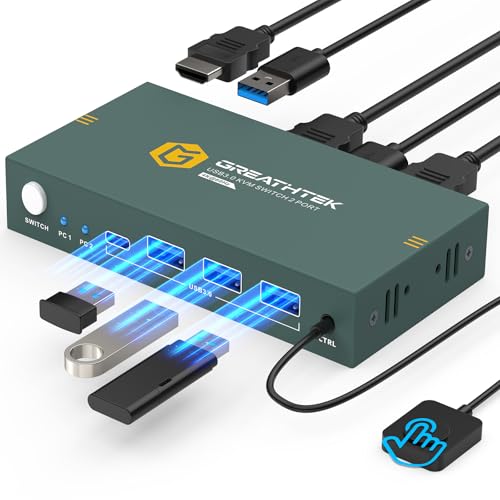
This 2-port KVM switch enables two computers to share a single monitor and USB peripherals like keyboards, mice, printers, and USB drives. It supports 4K at 60Hz and includes EDID compatibility to ensure proper display output. Its USB 3.0 ports provide faster data transfer for file-heavy peripherals, and compatibility spans Windows, macOS, and Linux environments, making it suitable for mixed setups in home or office spaces.
Buying Guide: Key Purchase Considerations
When evaluating a 2-way KVM switch, consider how you will use it day to day and what performance matters most in your environment. The following criteria help you compare options objectively.
- Display resolution and refresh rate: If you rely on high-detail visuals or gaming, prioritize 4K@60Hz or higher. Check for compatibility with 4K, 2K, and 1080p, and confirm whether the switch supports HDR and HDCP as needed for your content.
- Monitors and ports: Determine whether you need one or two monitors. If you require two displays, opt for a dual-monitor KVM with appropriate HDMI/DP inputs and confirm extended or simultaneous display support.
- USB port coverage and speed: For printers, external drives, or scanners, a switch with multiple USB 3.0 ports provides better performance. Verify whether USB-C or USB-A devices are supported and if extra cables are included.
- EDID and automatic recognition: EDID handling ensures stable display output and fewer setup headaches. Adaptive EDID can be beneficial if you work with different devices, but some users prefer fixed EDID for predictability.
- Switching method: Consider whether you want a front-panel button, a desktop controller, hotkeys, or a remote switch. Some models offer two switching modes for flexibility.
- Compatibility with devices: Ensure the switch supports your operating systems (Windows, macOS, Linux) and any consoles or laptops you use. Some switches specify PS4/Xbox compatibility for entertainment setups.
- Cable management: Check whether the package includes HDMI and USB cables. If not, factor in the cost and clutter of additional cables for your desk.
- Build quality and ease of use: Look for solid housings, clear LED indicators, and intuitive switching. A compact design minimizes desk clutter and makes relocation simpler.
- Future-proofing: If you plan to upgrade equipment soon, choose a model with higher bandwidth, robust EDID options, and the ability to handle higher resolutions and newer standards.
In summary, the best choice depends on whether you prioritize dual-monitor capabilities, speed for peripheral sharing, or straightforward plug-and-play operation. Reading product-specific details—like supported resolutions, number of USB ports, and EDID behavior—will help you select a model that reliably matches your daily workflow.