Finding a reliable 2.5″ SATA to USB adapter or enclosure is essential for quick data transfers, backups, and expanding laptop storage. This guide highlights top options that support USB 3.0 and UASP, deliver fast transfer speeds, and offer plug-and-play usability. Each pick below is geared toward American readers who value reliability, ease of use, and compatibility across Windows, macOS, and Linux systems. Read on to compare features, performance indicators, and practical considerations before buying.
Summary of chosen products
| Product | Brand | Type | |
|---|---|---|---|
| SABRENT SATA to USB Cable | SABRENT | USB 3.0 to 2.5″ SATA Adapter | UASP support, up to 5Gbps, hot-swappable, plug-and-play |
| FRIGRAF High Speed SATA to USB 3.0 Cable | FRIGRAF | USB 3.0 SATA Cable | Up to 5Gbps, no driver required, LED indicators |
| BENFEI 2.5 Inch External Enclosure | BENFEI | 2.5″ SATA Enclosure (USB-C/USB-A) | UASP, up to 5Gbps, tool-free installation, hot-swappable |
| BENFEI SATA to USB Cable | BENFEI | 2.5″ SATA to USB Cable | USB 3.0 up to 5Gbps, UASP, 70% faster read, 40% faster write |
| JSAUX SATA to USB Cable | JSAUX | 2.5″ SATA to USB Cable (Aluminum) | 5Gbps, UASP, aluminum shell, plug-and-play |
SABRENT SATA to USB Cable Review

The SABRENT adapter provides a simple bridge between a 2.5″ SATA drive and a computer. It supports SATA I/II/III drives, including SSDs, and uses USB 3.0 with UASP to boost data transfer rates. The design prioritizes plug-and-play operation with hot-swapping and no driver installation, making it ideal for quick backups or disk transfers. Compatibility spans Windows, macOS, and Linux, and the kit emphasizes portability for on-the-go storage tasks.
FRIGRAF High Speed SATA to USB Cable

FRIGRAF’s high-speed USB to SATA adapter is designed for 2.5″ HDDs and SSDs, supporting up to 5Gbps transfer speeds. The device works with both SATA drives and USB interfaces, and LED indicators help monitor connection status. It offers driver-free operation, making it a straightforward option for expanding storage or transferring files. Compatibility extends to popular drive brands, and the lightweight form factor supports easy portable use for backups or cloning jobs.
BENFEI 2.5 Inch External Enclosure

BENFEI’s 2.5″ enclosure converts a SATA SSD or HDD into a portable USB external drive. It features tool-free installation and supports USB-C or USB-A connections, offering up to 5Gbps with UASP support. The enclosure emphasizes ease of use—drive installation is quick, and the design is compatible with laptops, desktops, and gaming consoles. It’s a practical choice when needing a compact, reliable external storage solution that supports modern SSDs for fast data access.
BENFEI SATA to USB Cable (2in1)

This BENFEI 2.5″ SATA to USB cable is designed for easy plug-and-play use with 2.5″ drives. It delivers USB 3.0 performance up to 5Gbps and leverages UASP to improve transfer efficiency over traditional USB 3.0. The product is ideal for backing up laptops, transferring files, or performing data recoveries. Note that 3.5″ drives are not supported, so it’s best paired with 2.5″ HDDs and SSDs for quick, portable storage tasks.
JSAUX SATA to USB Cable
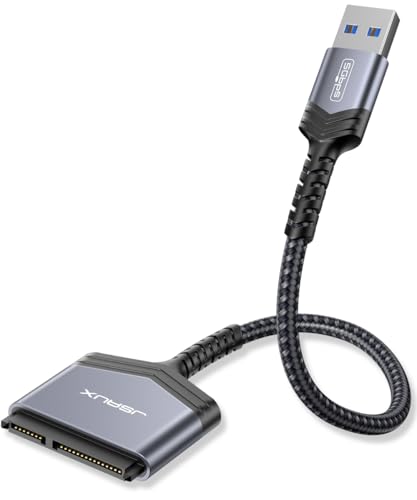
JSAUX offers a USB 3.0 to 2.5″ SATA hard drive adapter with an aluminum shell for durability and heat dissipation. It supports UASP and Trim, aiming for faster and more stable data transfers. The shell’s aluminum construction helps maintain cooler operation under load, making it suitable for frequent backups or large file transfers. It is compatible with Windows, MacOS, and Linux, and its plug-and-play nature makes it a dependable everyday storage upgrade option.
Buying Guide
Key considerations when choosing a 2.5″ SATA to USB adapter or enclosure include:
- Performance: Look for USB 3.0/3.1 (5Gbps) support and UASP to maximize read/write speeds, especially with SSDs.
- Connection type: USB-C vs USB-A matters for compatibility with newer laptops and devices. USB-C often supports newer devices with similar performance when paired with USB-C ports.
- Enclosure vs cable: Enclosures protect the drive and offer a permanent housing, while bare cables are more portable and quick to swap drives.
- Power requirements: Most 2.5″ drives are bus-powered, but some higher-capacity drives may benefit from external power in clamshell enclosures.
- Heat management: Aluminum shells and good ventilation help keep drives cooler during heavy transfers, extending drive life.
- Durability and build: Aluminum housings and robust cables reduce wear from repeated insertion/removal and daily transport.
- Compatibility and ease of use: Plug-and-play with no drivers is ideal; confirm compatibility with your operating system versions.
- Brand reliability: Reputable brands often provide better cable quality, longer lifespans, and straightforward RMA options.
In practice, users seeking quick data transfers or incremental backups will value devices that offer plug-and-play simplicity, solid transfer speeds, and robust construction. For cloning or large-file workflows, prioritize options with UASP support and sustained performance. If you frequently swap drives, a tool-free enclosure or a rugged cable can reduce setup time and wear. Finally, consider whether you prefer a compact cable for portability or an enclosure for added protection of the drive.