Finding a reliable 12″ x 17″ scanner helps when you regularly digitize maps, posters, blueprints, or large architectural drawings. The following selections are designed for wide-format tasks, offering fast speeds, high optical resolution, and user-friendly file management. Each option supports common operating systems and provides features that streamline post-scan workflows.
style=”font-weight:bold;”>Summary of Selected Products
| Product | Brand | Scan Area | Resolution | Key Benefit |
|---|---|---|---|---|
| Plustek OpticPro A320E | Plustek | 12″ x 17″ | up to 600 dpi (optical) / 1200 dpi interpolated | Fast 7.8-second wide-format scans |
| VIISAN VF3240 | VIISAN | 11.7″ x 16.7″ | 2400 x 2400 dpi | High-resolution A3 flatbed with frameless design |
| VIISAN 3120 A3 Flatbed | VIISAN | 11.7″ x 16.7″ | 1200 x 1200 dpi | Balanced speed and detail for large documents |
| HMWOKPOT A3 Large Format | HMWOKPOT | 12″ x 17″ | 2400 x 2400 dpi | High-definition color with Auto-Scan |
| COYEUX Large Format Flatbed | COYEUX | 12″ x 17″ | 2400 x 2400 dpi | Fast 4-second scans with Auto-Scan |
Note: All prices and availability can vary. Check compatibility with your computer system and software needs before purchasing.
Plustek OpticPro A320E — A3 Large Format Scanner
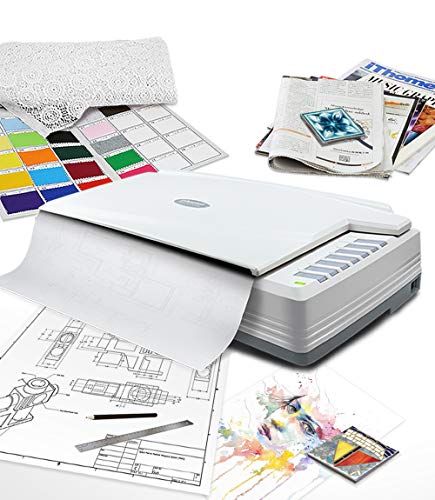
The Plustek OpticPro A320E supports up to a 12″ x 17″ scan area and is suited for A3-sized and wide-format materials such as maps, drawings, or large bound books. Doc Action helps organize files by destination, and the OCR feature enables searchable PDFs for improved document workflows. Batch scanning allows multiple images to be saved as a single or multiple PDF files on a PC or Mac.
VIISAN VF3240 Large Format Flatbed Scanner

VIISAN VF3240 offers an 11.7″ x 16.7″ capture area with a maximum optical resolution of 2400 x 2400 dpi. The frameless design and auto-scan feature boost efficiency, especially for school projects, graphic design, and digital publishing. It includes a universal power adapter for global use and supports Windows and Mac platforms.
VIISAN 3120 A3 Flatbed Scanner
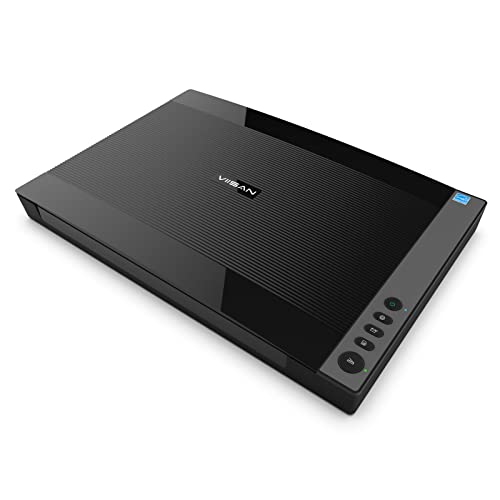
VIISAN 3120 is designed for high-quality scanning of large documents up to 11.98″ x 16.8″. It features an auto-scan function for hands-free operation and a fast 8-second color scan at 200 dpi. The device supports a universal power adapter and provides a 48-bit color depth for vibrant output, with frameless construction to minimize borders on scans.
HMWOKPOT A3 Large Format Flatbed Scanner

HMWOKPOT delivers high-speed scanning of up to 12″ x 17″ with a maximum optical resolution of 2400 x 2400 dpi. It emphasizes quick color accuracy and features a Smart Auto-Scan system that starts scanning when the lid closes. The LED light source reduces warm-up time and energy use for efficient daily use.
COYEUX Large Format Flatbed Scanner

COYEUX stands out with a 12″ x 17″ scanning area and a maximum optical resolution of 2400 x 2400 dpi. It emphasizes fast 4-second scans at 200 dpi and includes an Auto-Scan feature with an energy-efficient LED light source, suitable for offices and education environments needing reliable wide-format captures.
Buying Guide: Key Considerations For 12×17 Scanners
- Scan area and format: Confirm the exact maximum width and height (most models support up to 12″ x 17″ or 11.7″ x 16.7″). Choose based on typical documents like maps, CAD drawings, or large photos.
- Resolution and color depth: Higher optical resolution (e.g., 2400 x 2400 dpi) delivers finer detail, which is important for graphics and archival work. Look for 48-bit color depth for richer color accuracy.
- Speed and workflow features: If you frequently scan many pages, consider models with Auto-Scan, batch scanning, and quick-save destinations (PDF, JPEG, TIFF, etc.).
- Sensor type: CCD sensors generally deliver strong color accuracy for large-format scanning, while CIS sensors tend to be more compact and energy efficient but may have different color performance.
- Interface and compatibility: Ensure USB connectivity with Windows and Mac support, plus driver compatibility with TWAIN or ICA for seamless software integration.
- Power and reliability: Look for universal power adapters (AC 100–240V) for US and international use, and check for any warm-up requirements or LED efficiency features.
- Physical design: Frameless or near-frameless designs minimize borders around scanned content. Consider auto-features like Auto-Scan to streamline continuous tasks.
- Software ecosystem: OCR capabilities, batch PDF creation, and pre-configured scan destinations can significantly boost productivity.
- Budget vs. needs: For occasional large-format work, entry-level large-format scanners may suffice; for frequent use, prioritize speed, durability, and software support.