Choosing a reliable 12-port rack mount switch helps streamline network performance in small offices, home labs, or edge deployments. The models below cover unmanaged and managed options, with a mix of 12 to 16 ports to fit compact rack spaces. Each option offers sturdy build quality, ease of use, and solid performance for gigabit Ethernet needs. This guide highlights products from trusted brands and provides practical considerations to help you compare features, power efficiency, and cooling.
| Product | Brand | Ports | Type | Key Benefit |
|---|---|---|---|---|
| TP-Link TL-SG1016 | TP-Link | 16 | Unmanaged | Compact rack-mount, fanless, plug & play |
| TP-Link TL-SG1024S | TP-Link | 24 | Unmanaged | Energy-efficient, quiet operation |
| NETGEAR GS324 | NETGEAR | 24 | Unmanaged | Flexible placement: desktop, wall, rack |
| NETGEAR GS516 | NETGEAR | 16 | Unmanaged | Rackmount-friendly, compact 16-port |
| SODOLA 12 Port 10Gb Managed | SODOLA | 12 | Managed | 10G SFP+/Base-T with web GUI |
Across these options, you’ll find a balance between plug-and-play simplicity and more advanced management features. Consider port count in relation to your planned expansion, the physical rack space you have available, and whether you need PoE, 10G uplinks, or quiet operation in a noise-sensitive environment. The following product sections provide concise details to help you compare quickly and make an informed decision.
TP-Link TL-SG1016: 16-Port Gigabit Unmanaged Switch

The TL-SG1016 provides 16 Gigabit Ethernet ports with a compact, metal enclosure designed for rackmount installation. It operates fanlessly, which supports a quiet office environment and reduces maintenance. This unmanaged switch is ideal for growing networks that require simple, reliable layer-2 switching with minimal configuration. It supports IEEE 802.3x flow control for Full Duplex mode and backpressure for Half Duplex, helping prevent packet loss during busy periods and delivering steady performance for file sharing, backups, and high-speed connections.
TP-Link TL-SG1024S: 24-Port Unmanaged Switch
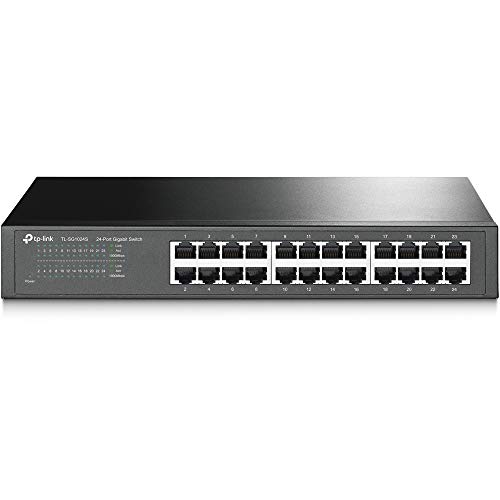
The TL-SG1024S expands capacity with 24 ports while maintaining a fanless, desktop or rackmountable form factor. It uses energy-efficient technology to reduce power consumption and supports auto-negotiation and Auto MDI/MDIX for easy connections. The single-switch design is suitable for offices or home labs that need to maximize port density without complex management features, enabling seamless expansion of wired devices like workstations, printers, and surveillance equipment.
NETGEAR GS324: 24-Port Unmanaged Switch
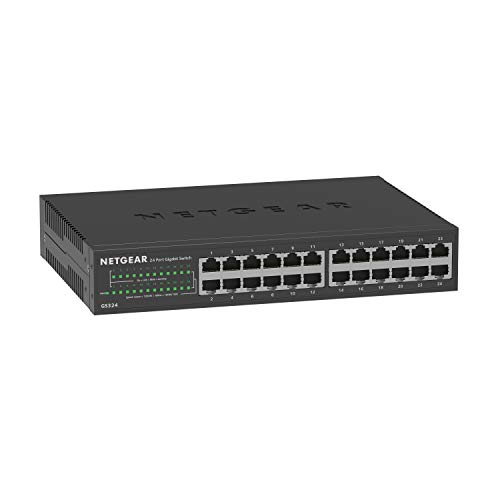
The GS324 provides 24 Gigabit ports with flexible placement options—desktop, wall, or rackmount. It’s designed for simple, no-fuss deployment and supports plug-and-play setup without software. This model is well-suited for small offices needing a dependable, low-maintenance switch to connect a fleet of desktops, printers, and access points, while keeping a straightforward management flow.
NETGEAR GS516: 16-Port Gigabit Unmanaged

The GS516 offers 16 Gigabit ports with straightforward plug-and-play use and rackmount readiness. Its compact footprint makes it suitable for smaller network cores or edge deployments where rack space is limited. It supports typical unmanaged features, making it a reliable choice for users who prefer a maintenance-free solution with dependable performance for daily tasks and basic network sharing.
SODOLA 12-Port 10Gb Managed Switch

The SODOLA 12-Port 10Gb managed switch combines 8x10G SFP+ ports with 4x10GBase-T RJ45 ports, delivering a flexible, high-performance foundation for demanding networks. It includes a Web GUI for management, enabling advanced features such as LACP link aggregation, QoS prioritization, VLAN segmentation, and SNMP monitoring. A 1U rack-mountable design and fan cooling help maintain stable performance in busy environments like NAS storage, media editing, or server clusters, though it is more feature-rich and configured than typical unmanaged options.
Buying Guide: Key Considerations for 12-Port Rack Mount Switches
When selecting a 12-port or slightly larger rack-mount switch, consider the following factors to align with your network goals:
- Unmanaged vs. managed: Unmanaged switches offer simplicity and minimal setup, ideal for small, stable networks. Managed switches provide control over QoS, VLANs, link aggregation, and monitoring, which benefits mid-sized networks or lab environments with traffic priority needs.
- Port configuration: If your plan includes future growth, a 16- or 24-port model might be more cost-effective than switching soon. Check whether the extra ports can be used for expansion or future devices.
- Rack compatibility: Confirm the device’s rack dimensions and mounting options. Some switches are desktop-oriented while others are designed for standard 19-inch racks with mounting ears or rails.
- Power and cooling: Fanless designs are quieter and suitable for office spaces, but active cooling can help sustain heavy traffic especially on higher port counts or 10G configurations.
- Performance features: For 10G readiness, look for SFP+/RJ-45 ports, backplane capacity, and switching capacity. QoS, VLANs, and SNMP support matter in managed models for traffic control and monitoring.
- Energy efficiency: Modern switches often include energy-saving features that reduce power draw during idle periods, a practical consideration for small offices and home labs.
- Warranty and support: A robust warranty and access to firmware updates can extend the life of the device in dynamic network environments.
For most small office setups, unmanaged 12-16 port switches provide reliable layer-2 switching with simple plug-and-play behavior. If you expect growth, plan for a model that offers more ports or lightweight management, so you can segment traffic, prioritize critical applications, and monitor performance without replacing hardware.
In evaluating options, compare the total port count against your immediate needs and any anticipated expansion. Consider whether you need 10G connectivity for high-speed storage or inter-server links, or if a standard Gigabit switch will suffice for desktops, printers, and access points. Also assess noise levels and power consumption to ensure the device fits the office or lab environment without adding unnecessary heat or hum.